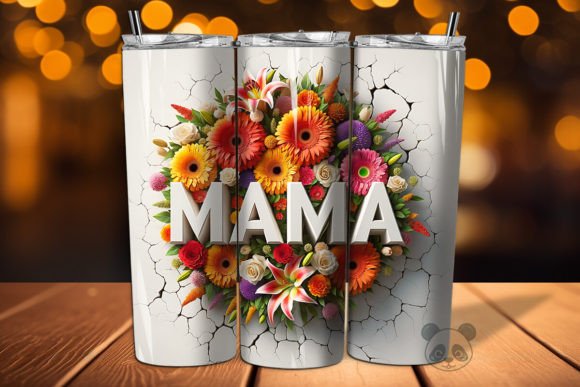
Mastering the Mama 3D Mother’s Day Tumbler Wrap for Flawless Sublimation Results
Creating personalized drinkware has evolved from a niche hobby into a thriving small business opportunity for many creators. Among the most popular items in this space is the Mama 3D Mother’s Day Tumbler Wrap. This specific design category combines emotional appeal with high-quality visual depth, making it a standout choice for spring sales. However, achieving a professional finish requires more than just purchasing a file and hitting print. Many beginners and even experienced sublimators overlook critical technical details that can ruin an otherwise beautiful project.
Understanding the nuances of digital downloads, specifically those labeled as 3D Tumbler wraps or seamless patterns, is essential for maintaining quality and customer satisfaction. This guide addresses common pitfalls associated with using these designs and provides actionable advice to ensure your final product meets high standards.
Understanding the Digital Asset
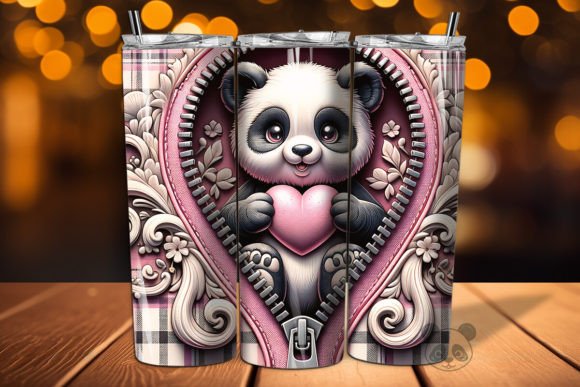
When you purchase a Mama 3D Mother’s Day Tumbler Wrap, you are acquiring a digital tool, not a physical product. The typical package includes a high-resolution PNG file, often sized around 9.3 inches by 8.2 inches at 300 DPI. This resolution is non-negotiable for crisp printing. The "3D" aspect refers to the visual depth created through shading, layering, and sometimes simulated textures like watercolor or metallic effects. These elements are designed to pop on curved surfaces, such as a 15 oz skinny tumbler.
A frequent misunderstanding arises when creators assume the file is ready to print without adjustment. While the file is provided in a standard size, your specific tumbler brand may have slightly different dimensions. Using a generic 15 Oz Tumbler Template without verifying measurements against your actual blank can lead to misalignment. The design might overlap the seam incorrectly or leave unsightly white gaps near the rim and base.
Common Mistakes and How to Avoid Them
Sublimation is a precise process. Small errors in preparation can result in significant waste of materials and time. Below are the most common issues encountered when working with Tumbler wrap sublimation files and how to correct them.
Ignoring Color Profile Differences
One of the most impactful mistakes involves color management. Digital screens display colors in RGB (Red, Green, Blue), while sublimation printers use CMYK (Cyan, Magenta, Yellow, Key/Black). A 3D background or watercolor effect may look vibrant on your monitor but appear dull or shifted when printed. This is particularly noticeable in designs featuring complex gradients or specific thematic colors, such as the greens and golds found in St Patrick Beer themed wraps.
The Fix: Always perform a test print on plain paper before using expensive sublimation paper. Check the colors under natural light. If your printer allows, create a custom ICC profile for your specific paper and ink combination. This ensures that the rich tones of your 3D design translate accurately to the physical object.
Misinterpreting "Seamless" and Wrap Dimensions
Many listings mention seamless pattern or St Patrick Beer seamless pattern. A seamless pattern is designed to repeat without visible joints. However, a tumbler wrap is a finite rectangle that must wrap around a cylinder. If you treat a seamless pattern as a simple wrap without adjusting for the circumference, the pattern may cut off awkwardly at the seam.
Furthermore, some users confuse the Mama 3D Mother’s Day Tumbler Wrap with standard flat prints. The curvature of the tumbler distorts images near the edges if not accounted for. If the design includes text or focal points, they must be centered correctly. Placing critical elements too close to the edge can result in them being hidden by the tumbler’s handle or distorted by the curve.
The Fix: Use a dedicated Tumbler wrap template that matches your specific blank. Measure the height and circumference of your tumbler precisely. In your design software, place the PNG file onto the template and adjust the scale to fit within the safe zone. Ensure that any repeating elements align logically if the design calls for it.
Overlooking File Preparation for Sublimation
Receiving a ZIP file with a single PNG is standard. However, simply opening and printing this file is insufficient for high-end results. Many creators forget to mirror the image. Sublimation requires the design to be printed in reverse so that it transfers correctly onto the tumbler. Printing a 3D Tumbler wrap without mirroring will result in backward text and reversed shadows, destroying the 3D illusion.
Additionally, printer settings play a crucial role. Using standard "plain paper" settings instead of "high quality" or "sublimation" settings can lead to banding lines or ink bleeding. This is especially detrimental to detailed designs like St Patrick Beer watercolor backgrounds, where smooth transitions are key to the aesthetic.
The Fix: Always mirror your image horizontally before printing. Set your printer to the highest quality mode suitable for sublimation paper. Ensure your heat press settings (time, temperature, and pressure) are calibrated for your specific tumbler material. Inconsistent pressure can cause ghosting, where the image appears double or blurred.
Evaluating Design Quality Before Purchase
Not all digital downloads are created equal. When browsing for Sublimation Designs, look for specific indicators of quality. A reputable seller will provide clear information about the file’s resolution and dimensions. For a Mama 3D Mother’s Day Tumbler Wrap, the file should be at least 300 DPI. Lower resolutions will appear pixelated when printed on a large surface like a tumbler.
Check the preview images carefully. Do they show the design on a mockup? Are there close-ups of the texture? High-quality 3D Tumbler sublimation files will showcase depth and detail. Be wary of designs that look flat or overly saturated, as these may not translate well to physical products.
Consider the versatility of the design. A good Tumbler wrap PNG should work well on various tumbler sizes, not just one specific model. If the listing mentions compatibility with St Patrick Beer skinny Tumbler or other variations, it suggests the designer has considered different aspect ratios. This flexibility adds value to your purchase, allowing you to offer a wider range of products to your customers.
Best Practices for Professional Results
To maximize the potential of your Digital Download, adopt a systematic workflow. Start by organizing your files. Keep your original PNGs in a separate folder from your edited, mirrored print-ready files. This prevents accidental overwrites and makes it easier to track which designs have been tested.
Invest time in learning your equipment. Understand how your heat press distributes heat. Uneven heating can cause color variations across the 3D background. Use heat-resistant tape to secure your sublimation paper tightly against the tumbler. Any movement during the pressing process will result in blurring, which is particularly noticeable in intricate 3D design elements.
Finally, communicate clearly with your customers. If you are selling finished tumblers, specify that slight variations in color may occur due to monitor differences and sublimation processes. This manages expectations and reduces disputes. If you are selling the digital files themselves, include a brief guide on how to use the Tumbler wrap template effectively. Adding value through education can distinguish your shop from competitors.
By paying attention to these details, you transform a simple Instant Digital Download PNG into a premium product. Whether you are creating a heartfelt gift for Mother’s Day or a festive item for St. Patrick’s Day, precision and preparation are the keys to success. Embrace the learning curve, test rigorously, and refine your process. The result will be high-quality, visually stunning tumblers that stand out in a crowded market.